Posts created by “skeirss”

Test title

Written by skeirss

Hello everyone. This will be my rough draft notebook, where I'll write my random thoughts in poor English, along with technical notes for personal use. You won't find anything interesting here, so if you've randomly stumbled upon this blog, you can leave now without any regret.

Anime backlog app

Written by skeirss

There's a little oddity about me: I like to make lists and do things systematically and in order. I also like to watch anime, and there are a lot of anime that I’m planning to watch later. And so I had a need to create an app that would solve my problem of making lists of anime that I would like to watch in the future.

Before creating this app, I was making do with Google Docs spreadsheets, but I wanted to create something of my own, with features that are difficult or impossible to implement in spreadsheets (for example, requesting information about anime from an external database using the API). And besides, it happened that I got a subscription to chatgpt plus, and so I decided to try my hand at so-called “vibe coding”.

I have created applications, simple programs and scripts for my personal use before, but this time I decided to take the project seriously, having read quite a lot of material about vibe-coding.

I used a tactic of the multi-staged prompting with set a set of high-quality build prompts. Here’s the sets of prompts I used to create my “anime-backlog” app: https://github.com/bernd32/anime-tracker-web/blob/main/prompts.txt I have put a lot of effort into creating these sets of LLM prompts, but it was worth it because the app turned out quite well. I'm not a professional programmer, but I think my app would be perfectly ready for production, if it weren't for the fact that it's for my personal use and might only be of interest to me.

Here’s the link to the application I’m talking about: https://backlog.bernd32.xyz

By the way, there are a lot (most of them) of the features that are not available to non-logged users. Basically, all actions that can modify the database are available only to logged users (only to me, basically).

And here’s the github repo: https://github.com/bernd32/anime-tracker-web/

The full list of features in this app:

Core backlog management

  • Track anime entries with name, year, season, status, type, comment, URL, and downloaded flag.
  • Create new anime entries.
  • Edit existing anime entries.
  • Delete individual anime entries.
  • Prevent duplicate entries with the same normalized name, year, and season.
  • Validate years in the supported range.
  • Normalize pre-2010 entries to the "Other" season bucket.

Library organization and browsing

  • Dashboard view for tracked years from 2010 onward.
  • Separate "Pre-2010" library view for titles released before 2010.
  • Per-year library pages grouped by season.
  • Pre-2010 list sorted alphabetically.
  • Global search by anime name within the current view.
  • Sidebar navigation with quick links to dashboard, Pre-2010, statistics, and all tracked years.

Progress and status tracking

  • Track anime status as unwatched, watching, or completed.
  • Track whether an anime has been downloaded.
  • Year progress card with completion percentage and progress bar.
  • Pre-2010 progress card with completion percentage and progress bar.
  • Year list completion percentages in the sidebar.
  • Color-coded list rows/cards based on status and downloaded state.

Random selection

  • Random pick button for the current scope.
  • Random pick limited to unwatched titles in the selected scope.

Statistics

  • Overall backlog totals and completion percentage.
  • Counts by status.
  • Counts by type.
  • Pre-2010 totals and completion stats.
  • Per-year totals and completion stats.

Import and export

  • CSV export of the backlog.
  • CSV import with dry-run preview mode.
  • CSV import validation with row-level errors and warnings.
  • Duplicate detection during import.
  • Automatic coercion of invalid seasons and statuses during import when possible.

Shikimori metadata

  • Fetch cached metadata from Shikimori for an anime entry.
  • Display Russian title, Japanese title, score, episode count, air date, studios, genres, and description.
  • Strip character-link markup from returned descriptions.
  • Cache Shikimori metadata in memory and in the database.
  • Owner-only manual refresh endpoint for Shikimori metadata.
  • Owner-only cache reset for Shikimori metadata.
  • Fallback to stale cached Shikimori data when the upstream request fails.

Authentication and access control

  • Read-only access for anonymous visitors.
  • Single owner sign-in flow for write access.
  • Owner-only create, edit, delete, import, year-delete, preferences-update, Shikimori refresh, and Shikimori cache reset actions.
  • CSRF protection for write requests.
  • Signed session cookies for authenticated access.
  • Login throttling with configurable failure limit, rolling window, and lockout duration.

Preferences and settings

  • Preferences page protected by owner access.
  • Remember last visited scope kind.
  • Remember last visited scope year.
  • Remember last used season.
  • Theme preference setting.
  • Density preference setting.

Year management

  • List tracked years from 2010 onward.
  • Delete an entire year and all anime entries in that year.

UI and UX

  • Responsive layout for desktop and mobile.
  • Mobile navigation drawer.
  • Add anime button shown only to users with write access.
  • Import / Export menu shown only to users with write access.
  • External links for anime URLs.
  • Login redirect back to the intended page after successful sign-in.

Backend and operational features

  • FastAPI backend with structured API routes.

  • PostgreSQL persistence.

  • Alembic database migrations.

  • Docker Compose setup for production-style deployment.

  • Development Docker overlay for local bind-mounted development.

  • Health and readiness endpoints.

  • Configurable CORS settings.

  • Configurable Shikimori proxy support.

And if you think that a set of high-quality prompts allowed me to create the app perfectly on my first try, you're very much mistaken. The first attempt was a flop, and I had to ask LLM to fix quite a few syntax errors and bugs, as well as add and fix various features. However, this helped me to create a fairly solid framework (architecture) for a high-quality application, so any rough edges that appeared during “development” were very easy to fix, as they hardly affected the core architecture of the application that was created the first time.

Borgmatic backup issue

Written by skeirss

Problem

When running borgmatic create prune via the systemd service (borgmatic.service), the backup process hung indefinitely during the create phase after the log line Processing files … and the warning /var/lib/docker/containers/...-json.log: file changed while we backed it up.

The hang occurred only when the database hooks were active (mariadb_databases and sqlite_databases). These hooks automatically enable --read-special and cause borgmatic to include temporary dump files, which in turn triggered extensive special-file exclusions under /var/lib/docker. A broad exclusion - /var/lib/docker/** prevented the hang but also omitted all Docker volume data (persistent application files located under /var/lib/docker/volumes/).

Manual execution of borgmatic create from an interactive root shell completed successfully, confirming the issue was specific to the non-interactive systemd execution environment combined with Docker’s overlay2 layers, container logs, and runtime files.

Root Cause

  • Database hooks force --read-special and interact with rapidly changing or special files inside /var/lib/docker.

  • Borg’s file processing becomes blocked when encountering Docker overlay files, container log files that change during backup, and certain pseudo-files in the overlay2 directory.

  • The broad Docker exclusion resolved the hang but removed the desired volume backups.

Solution

Retain the database hooks (they provide consistent, point-in-time dumps) and replace the broad Docker exclusion with granular exclusions that target only the ephemeral/problematic paths. Update the exclude_patterns section in /etc/borgmatic/config.yaml as follows (add/replace the Docker-related lines):

exclude_patterns:
...
  - /var/lib/docker/overlay2/**
  - /var/lib/docker/containers/**
  - /var/lib/docker/image/**
  - /var/lib/docker/tmp/**
  - /var/lib/docker/volumes/*/_data/*.log

More info about this issue in the docs: https://torsion.org/borgmatic/how-to/backup-your-databases/

Organazing home backup system

Written by skeirss

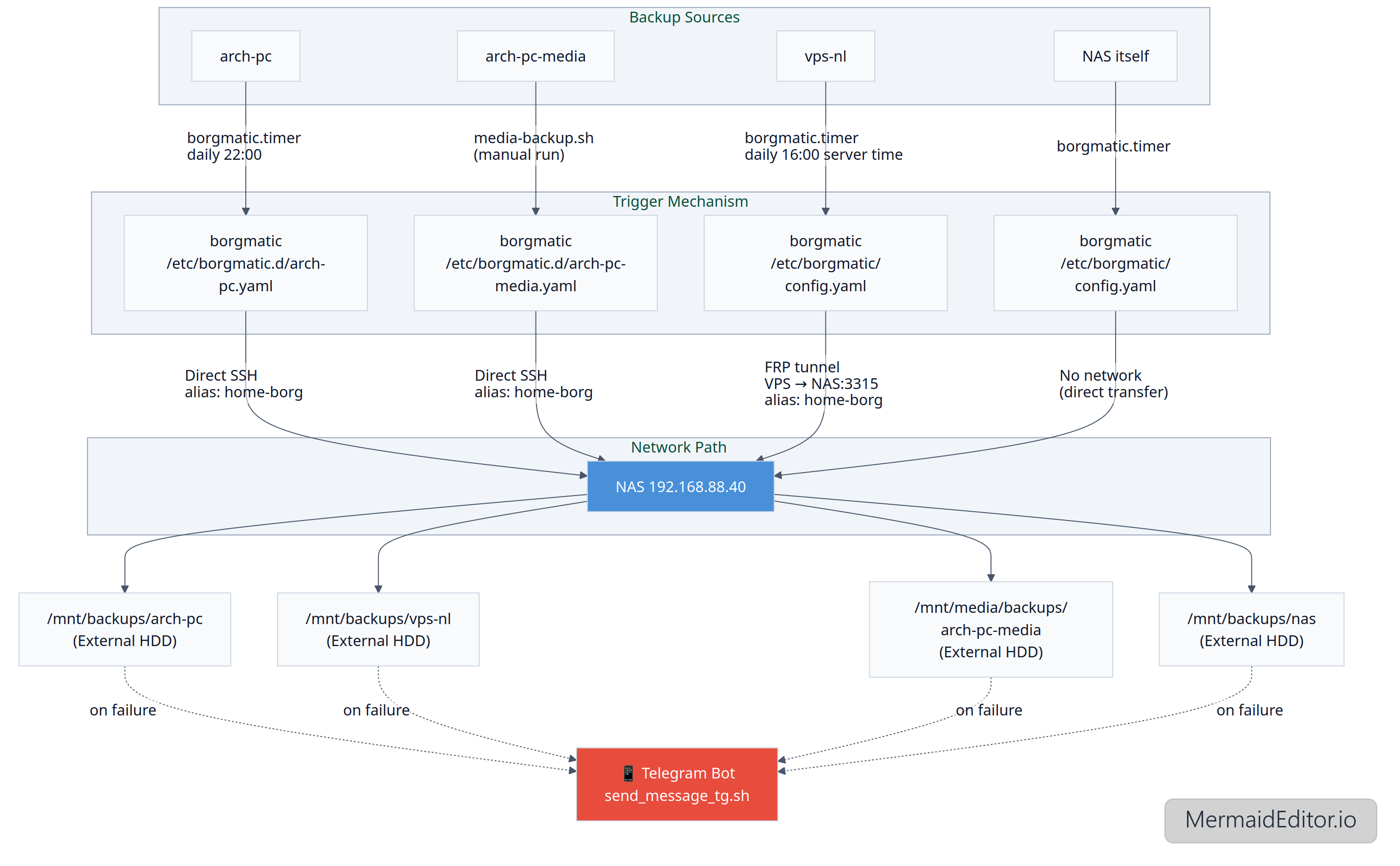
I've organized my first home automated backup system and tried my best to describe it (the system seems a bit complicated to me, so in case something goes wrong I'll definitely need a reference). Since this is my first attempt at setting up a backup system, it may have some flaws.

Backup System Documentation

TL;DR

  • All backups are stored on NAS (192.168.88.40)
  • Storage path: /srv/backups, /mnt/media/backups (for media)
  • Tools: borg + borgmatic + bash scripts
  • Clients: arch-pc, vps-nl, NAS itself
  • Check status: systemctl status borgmatic.timer
  • Logs: journalctl -u borgmatic.service
  • Restore: see "Restore" section

Architecture

[arch-pc] ──(borgmatic.timer -> daily at 22:00)──borgmatic {/etc/borgmatic.d/arch-pc.yaml} ──▶ [NAS]──/srv/backups/arch-pc (Samsung SSD)

[vps-nl] ──(borgmatic.timer -> daily at 16:00 Server time (21:00 EKT))──borgmatic {/etc/borgmatic/config.yaml} ──▶ [NAS]──/srv/backups/vps-nl (Samsung SSD)

[arch-pc-media] ──media-backup.sh (running manually)──borgmatic {/etc/borgmatic.d/arch-pc-media.yaml} ──▶ [NAS]──/mnt/media/backups/arch-pc-media (External HDD)

[nas] ──(borgmatic.timer)──borgmatic {/etc/borgmatic/config.yaml}──▶ /srv/backups/nas (Samsung SSD)

Networking

arch-pc → NAS
  • Direct SSH connection
  • SSH Alias: home-borg (described in /root/.ssh/config)
  • Path: ssh://home-borg/srv/backups/arch-pc
arch-pc-media → NAS
VPS → NAS
  • Reverse SSH tunnel (described in /etc/systemd/system/ssh-tunnel-persistent_amsterdam.service)
  • Mapping: VPS localhost:2233 → NAS:3315
  • SSH Alias: home-borg (described in /root/.ssh/config)
  • Path: ssh://home-borg/srv/backups/vps-nl
NAS → NAS
  • No network, direct data transfer

Storage Layout

/srv/backups/

arch-pc/

vps-nl/

nas/

/run/media/bernd/backups/

arch-pc-media/

Archive format: {hostname}-{timestamp}

Monitoring

Notifications:

  • Telegram bot

Triggers:

  • success
  • failure

Script:

  • /usr/local/bin/send_message_tg.sh

Restore

List archives: borg list /path/to/repo or outside the NAS: borgmatic repo-list --config /etc/borgmatic.d/arch-pc.yaml

Mount the archive to /mnt/borg (*): sudo borgmatic mount --config /etc/borgmatic.d/arch-pc.yaml --archive archpc-2025-10-03T21:25:12 --mount-point /mnt/borg

Unmount: sudo borgmatic umount --mount-point /mnt/borg

Extract a file from the archive: sudo borgmatic extract --config /etc/borgmatic.d/arch-pc.yaml --archive archpc-2025-10-03T21:25:12 --path /path/to/file/to/extact --destination /tmp

Restore all files from the archive: borgmatic extract --config /etc/borgmatic.d/arch-pc.yaml --archive archpc-2025-10-03T21:25:12

(*) fuse2 and python-llfuse packages should be installed

DB restore

The borgmatic configuration file used for the original backup must be available on the host.

Case 1. Restore all configured databases from the latest archive: /root/.local/bin/borgmatic restore --config /etc/borgmatic/config.yaml --archive latest

Case 2. Restore a specific database (e.g., only Bookstack’s MariaDB): 1) Stop all containers that use the mariadb container, e.g.: docker stop bookstack; 2) borgmatic restore --config /etc/borgmatic/config.yaml --archive latest --database bookstack

Case 3. Restore only the Chyrp-lite SQLite database: 1) Stop the container; 2) /root/.local/bin/borgmatic restore --config /etc/borgmatic/config.yaml --archive latest --database chyrp

Troubleshooting

Case 1. borg.crypto.key.ArchiveTAMInvalid: Data integrity error: Archive authentication did not verify error when trying to open an archive

Solution: This problem is related to Trusted Archive Metadata (TAM). The solution is to repair the archives:

su - 

BORG_WORKAROUNDS=ignore_invalid_archive_tam borg upgrade --archives-tam /path/to/repo

Check: borg check /path/to/repo

To-Do

  • Docker containers configs + DB backup and restore (done)
  • There are two weak points in the current setup: the NAS backing up to itself (so this is not really a backup, just versioning), and the lack of an offsite backup. Both issues could be addressed by periodically copying backup archives to an encrypted external drive stored elsewhere.

Docker container traffic routing through proxy

Written by skeirss

So today last.fm stopped working for Russia:

❯ curl -I https://www.last.fm/ | head -n1
HTTP/2 403

So here's the problem: now my dockerized Navidrome server won't scrobble tracks to last.fm, and since Navidrome doesn't support proxy configuration, I have to route all network traffic from the container through a proxy server.

Sometimes I feel like I'm between a rock and a hard place, because the restrictions are coming from both sides... But something good always comes out of every bad situation, and from this one I'll learn a bit more about proxying docker containers. Anyways.

What's my goal: make Navidrome scrobble tracks to last.fm again by routing its traffic though my host machine's Xray proxy. What's my steps:

  • Install and configure xray on my server
  • Update docker compose, add proxy variables

So first I need to update my Xray configuration. Basically I need to tell Xray to listen on all network interfaces (0.0.0.0) so the Docker container can reach it:

  "inbounds": [
    {
      "listen": "0.0.0.0",
      "port": 10808,
      "protocol": "socks"
    },
    {
      "listen": "0.0.0.0",
      "port": 10809,
      "protocol": "http"
    }
  ],

And since my server is local and working behind a router and cg-nat, it is a safe approach.

Now I need to update my docker compose file, so Navidrome can find the host and use the proxy vars:

services:
  navidrome:
    extra_hosts:
      - "host.docker.internal:host-gateway"
    environment:
      - HTTP_PROXY=http://host.docker.internal:10809
      - HTTPS_PROXY=http://host.docker.internal:10809
      - ALL_PROXY=socks5://host.docker.internal:10808
      - NO_PROXY=localhost,127.0.0.1

Why extra_hosts? It creates a "map" so the container knows host.docker.internal = your host machine's IP. Checking that variables described in the docker file are read within the container:

 root@thinkcentre:~# docker exec navidrome-navidrome-1 env | grep -i proxy
no_proxy=localhost,127.0.0.1
http_proxy=http://host.docker.internal:10809
https_proxy=http://host.docker.internal:10809
all_proxy=socks5://host.docker.internal:10809

Looks like it's fine. Too bad we can't test connection inside the container using curl, because there's no such utility in the container. Let's just play a song and see if it is scrobbling or not: Yes, it is working as intended, yay!

Only what he finds conducive is to his taste; his pleasure, his enjoyment stops when the mark of what is conducive is overstepped. He guesses correctly what will heal harm, he exploits strokes of bad luck to his advantage; what does not kill him makes him stronger.