Posts tagged with “linux”

Borgmatic backup issue

Written by skeirss

Problem

When running borgmatic create prune via the systemd service (borgmatic.service), the backup process hung indefinitely during the create phase after the log line Processing files … and the warning /var/lib/docker/containers/...-json.log: file changed while we backed it up.

The hang occurred only when the database hooks were active (mariadb_databases and sqlite_databases). These hooks automatically enable --read-special and cause borgmatic to include temporary dump files, which in turn triggered extensive special-file exclusions under /var/lib/docker. A broad exclusion - /var/lib/docker/** prevented the hang but also omitted all Docker volume data (persistent application files located under /var/lib/docker/volumes/).

Manual execution of borgmatic create from an interactive root shell completed successfully, confirming the issue was specific to the non-interactive systemd execution environment combined with Docker’s overlay2 layers, container logs, and runtime files.

Root Cause

  • Database hooks force --read-special and interact with rapidly changing or special files inside /var/lib/docker.

  • Borg’s file processing becomes blocked when encountering Docker overlay files, container log files that change during backup, and certain pseudo-files in the overlay2 directory.

  • The broad Docker exclusion resolved the hang but removed the desired volume backups.

Solution

Retain the database hooks (they provide consistent, point-in-time dumps) and replace the broad Docker exclusion with granular exclusions that target only the ephemeral/problematic paths. Update the exclude_patterns section in /etc/borgmatic/config.yaml as follows (add/replace the Docker-related lines):

exclude_patterns:
...
  - /var/lib/docker/overlay2/**
  - /var/lib/docker/containers/**
  - /var/lib/docker/image/**
  - /var/lib/docker/tmp/**
  - /var/lib/docker/volumes/*/_data/*.log

More info about this issue in the docs: https://torsion.org/borgmatic/how-to/backup-your-databases/

Organazing home backup system

Written by skeirss

I've organized my first home automated backup system and tried my best to describe it (the system seems a bit complicated to me, so in case something goes wrong I'll definitely need a reference). Since this is my first attempt at setting up a backup system, it may have some flaws.

Backup System Documentation

TL;DR

  • All backups are stored on NAS (192.168.88.40)
  • Storage path: /srv/backups, /mnt/media/backups (for media)
  • Tools: borg + borgmatic + bash scripts
  • Clients: arch-pc, vps-nl, NAS itself
  • Check status: systemctl status borgmatic.timer
  • Logs: journalctl -u borgmatic.service
  • Restore: see "Restore" section

Architecture

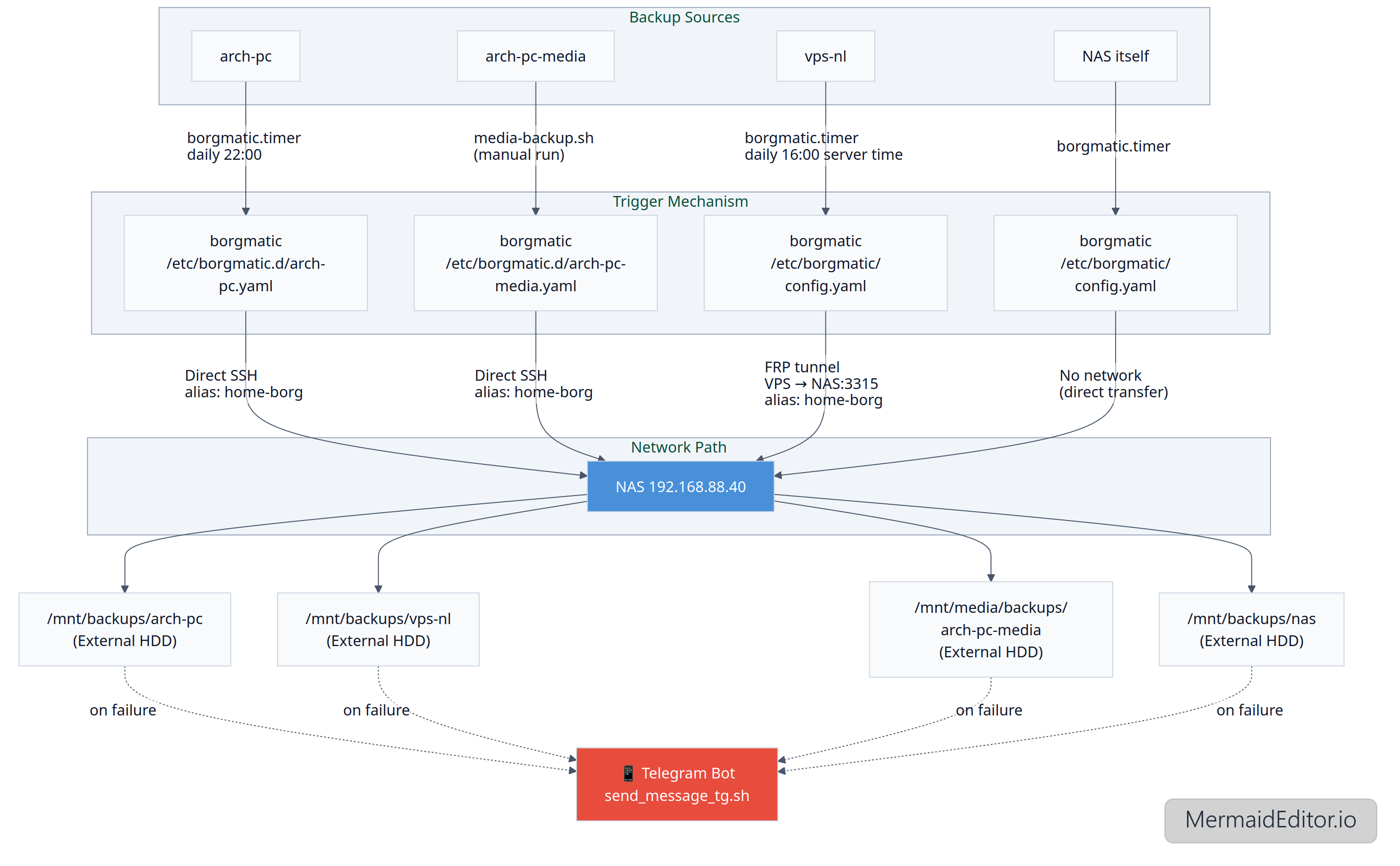
[arch-pc] ──(borgmatic.timer -> daily at 22:00)──borgmatic {/etc/borgmatic.d/arch-pc.yaml} ──▶ [NAS]──/srv/backups/arch-pc (Samsung SSD)

[vps-nl] ──(borgmatic.timer -> daily at 16:00 Server time (21:00 EKT))──borgmatic {/etc/borgmatic/config.yaml} ──▶ [NAS]──/srv/backups/vps-nl (Samsung SSD)

[arch-pc-media] ──media-backup.sh (running manually)──borgmatic {/etc/borgmatic.d/arch-pc-media.yaml} ──▶ [NAS]──/mnt/media/backups/arch-pc-media (External HDD)

[nas] ──(borgmatic.timer)──borgmatic {/etc/borgmatic/config.yaml}──▶ /srv/backups/nas (Samsung SSD)

Networking

arch-pc → NAS
  • Direct SSH connection
  • SSH Alias: home-borg (described in /root/.ssh/config)
  • Path: ssh://home-borg/srv/backups/arch-pc
arch-pc-media → NAS
VPS → NAS
  • Reverse SSH tunnel (described in /etc/systemd/system/ssh-tunnel-persistent_amsterdam.service)
  • Mapping: VPS localhost:2233 → NAS:3315
  • SSH Alias: home-borg (described in /root/.ssh/config)
  • Path: ssh://home-borg/srv/backups/vps-nl
NAS → NAS
  • No network, direct data transfer

Storage Layout

/srv/backups/

arch-pc/

vps-nl/

nas/

/run/media/bernd/backups/

arch-pc-media/

Archive format: {hostname}-{timestamp}

Monitoring

Notifications:

  • Telegram bot

Triggers:

  • success
  • failure

Script:

  • /usr/local/bin/send_message_tg.sh

Restore

List archives: borg list /path/to/repo or outside the NAS: borgmatic repo-list --config /etc/borgmatic.d/arch-pc.yaml

Mount the archive to /mnt/borg (*): sudo borgmatic mount --config /etc/borgmatic.d/arch-pc.yaml --archive archpc-2025-10-03T21:25:12 --mount-point /mnt/borg

Unmount: sudo borgmatic umount --mount-point /mnt/borg

Extract a file from the archive: sudo borgmatic extract --config /etc/borgmatic.d/arch-pc.yaml --archive archpc-2025-10-03T21:25:12 --path /path/to/file/to/extact --destination /tmp

Restore all files from the archive: borgmatic extract --config /etc/borgmatic.d/arch-pc.yaml --archive archpc-2025-10-03T21:25:12

(*) fuse2 and python-llfuse packages should be installed

DB restore

The borgmatic configuration file used for the original backup must be available on the host.

Case 1. Restore all configured databases from the latest archive: /root/.local/bin/borgmatic restore --config /etc/borgmatic/config.yaml --archive latest

Case 2. Restore a specific database (e.g., only Bookstack’s MariaDB): 1) Stop all containers that use the mariadb container, e.g.: docker stop bookstack; 2) borgmatic restore --config /etc/borgmatic/config.yaml --archive latest --database bookstack

Case 3. Restore only the Chyrp-lite SQLite database: 1) Stop the container; 2) /root/.local/bin/borgmatic restore --config /etc/borgmatic/config.yaml --archive latest --database chyrp

Troubleshooting

Case 1. borg.crypto.key.ArchiveTAMInvalid: Data integrity error: Archive authentication did not verify error when trying to open an archive

Solution: This problem is related to Trusted Archive Metadata (TAM). The solution is to repair the archives:

su - 

BORG_WORKAROUNDS=ignore_invalid_archive_tam borg upgrade --archives-tam /path/to/repo

Check: borg check /path/to/repo

To-Do

  • Docker containers configs + DB backup and restore (done)
  • There are two weak points in the current setup: the NAS backing up to itself (so this is not really a backup, just versioning), and the lack of an offsite backup. Both issues could be addressed by periodically copying backup archives to an encrypted external drive stored elsewhere.

Docker container traffic routing through proxy

Written by skeirss

So today last.fm stopped working for Russia:

❯ curl -I https://www.last.fm/ | head -n1
HTTP/2 403

So here's the problem: now my dockerized Navidrome server won't scrobble tracks to last.fm, and since Navidrome doesn't support proxy configuration, I have to route all network traffic from the container through a proxy server.

Sometimes I feel like I'm between a rock and a hard place, because the restrictions are coming from both sides... But something good always comes out of every bad situation, and from this one I'll learn a bit more about proxying docker containers. Anyways.

What's my goal: make Navidrome scrobble tracks to last.fm again by routing its traffic though my host machine's Xray proxy. What's my steps:

  • Install and configure xray on my server
  • Update docker compose, add proxy variables

So first I need to update my Xray configuration. Basically I need to tell Xray to listen on all network interfaces (0.0.0.0) so the Docker container can reach it:

  "inbounds": [
    {
      "listen": "0.0.0.0",
      "port": 10808,
      "protocol": "socks"
    },
    {
      "listen": "0.0.0.0",
      "port": 10809,
      "protocol": "http"
    }
  ],

And since my server is local and working behind a router and cg-nat, it is a safe approach.

Now I need to update my docker compose file, so Navidrome can find the host and use the proxy vars:

services:
  navidrome:
    extra_hosts:
      - "host.docker.internal:host-gateway"
    environment:
      - HTTP_PROXY=http://host.docker.internal:10809
      - HTTPS_PROXY=http://host.docker.internal:10809
      - ALL_PROXY=socks5://host.docker.internal:10808
      - NO_PROXY=localhost,127.0.0.1

Why extra_hosts? It creates a "map" so the container knows host.docker.internal = your host machine's IP. Checking that variables described in the docker file are read within the container:

 root@thinkcentre:~# docker exec navidrome-navidrome-1 env | grep -i proxy
no_proxy=localhost,127.0.0.1
http_proxy=http://host.docker.internal:10809
https_proxy=http://host.docker.internal:10809
all_proxy=socks5://host.docker.internal:10809

Looks like it's fine. Too bad we can't test connection inside the container using curl, because there's no such utility in the container. Let's just play a song and see if it is scrobbling or not: Yes, it is working as intended, yay!

Only what he finds conducive is to his taste; his pleasure, his enjoyment stops when the mark of what is conducive is overstepped. He guesses correctly what will heal harm, he exploits strokes of bad luck to his advantage; what does not kill him makes him stronger.