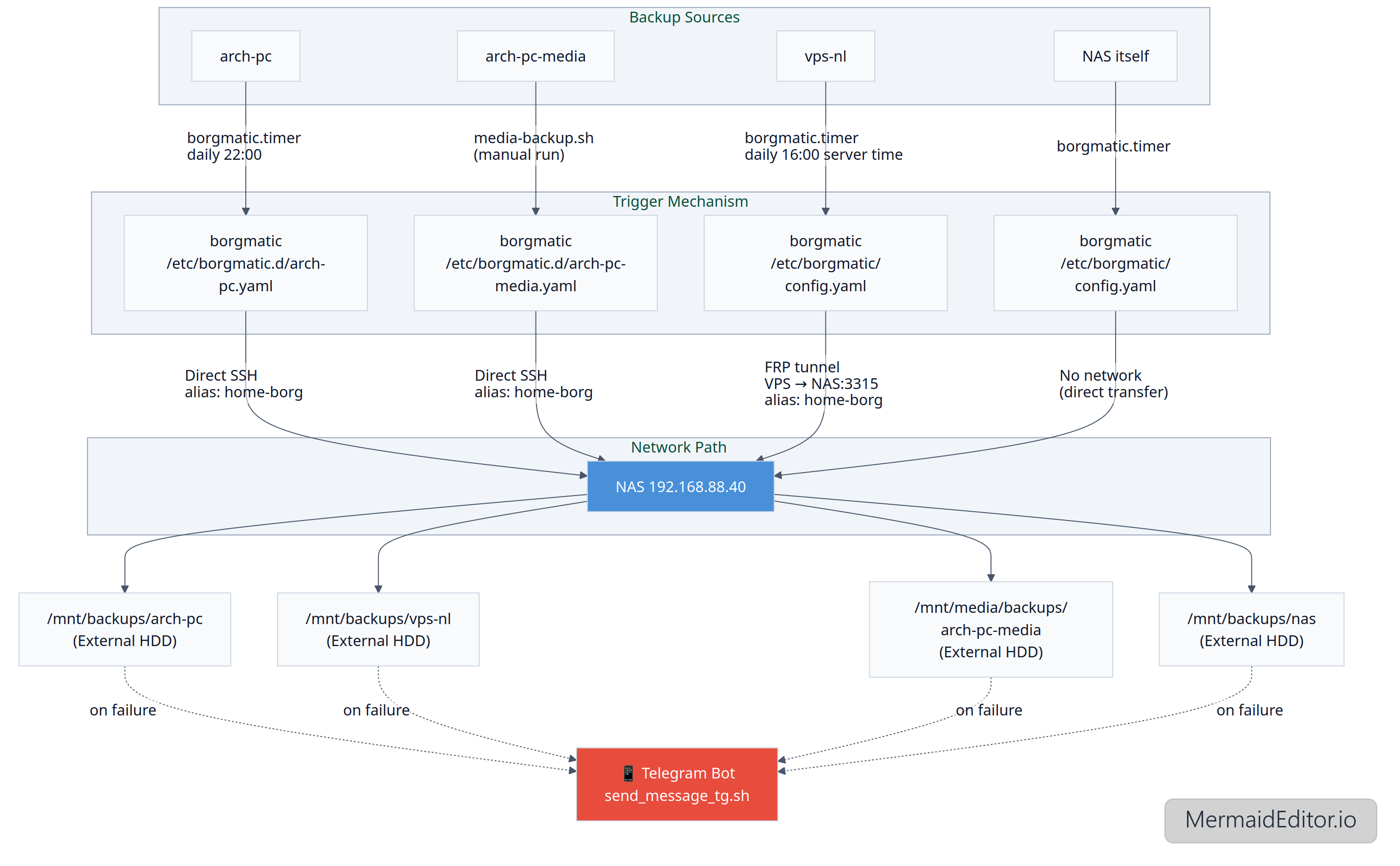
I've organized my first home automated backup system and tried my best to describe it (the system seems a bit complicated to me, so in case something goes wrong I'll definitely need a reference). Since this is my first attempt at setting up a backup system, it may have some flaws.
Backup System Documentation
TL;DR
- All backups are stored on NAS (192.168.88.40)
- Storage path: /srv/backups, /mnt/media/backups (for media)
- Tools: borg + borgmatic + bash scripts + ansible (optional, for bootstrapping)
- Current Clients: arch-pc, vps-nl, NAS itself
- Check status:
systemctl status borgmatic.timer
- Logs:
journalctl -u borgmatic.service
- Restore: see "Restore" section
Architecture
[arch-pc] ──(borgmatic.timer -> daily at 22:00)──borgmatic {/etc/borgmatic.d/arch-pc.yaml} ──▶ [NAS]──/mnt/backups/arch-pc (External HDD)
[vps-nl] ──(borgmatic.timer -> daily at 16:00 Server time (21:00 EKT))──borgmatic {/etc/borgmatic/config.yaml} ──▶ [NAS]──/mnt/backups/vps-nl (External HDD)
[arch-pc-media] ──media-backup.sh (running manually)──borgmatic {/etc/borgmatic.d/arch-pc-media.yaml} ──▶ [NAS]──/mnt/media/backups/arch-pc-media (External HDD)
[nas] ──(borgmatic.timer)──borgmatic {/etc/borgmatic/config.yaml}──▶ /mnt/backups/nas (External HDD)
Networking
arch-pc → NAS
- Direct SSH connection
- SSH Alias: home-borg (described in
/root/.ssh/config)
- Path:
ssh://home-borg/mnt/backups/arch-pc
arch-pc-media → NAS
VPS → NAS
- FRP tunnel (
/etc/frp/frpc.toml) from VPS to NAS
- Mapping: VPS:[redacted] → NAS:3315
- SSH Alias: home-borg (described in
/root/.ssh/config)
- Path: ssh://home-borg/mnt/backups/vps-nl
NAS → NAS
- No network, direct data transfer
Storage Layout
/mnt/backups/
arch-pc/
vps-nl/
nas/
/run/media/bernd/backups/
arch-pc-media/
Archive format: {hostname}-{timestamp}
Monitoring
Notifications:
Triggers:
Script:
- /usr/local/bin/send_message_tg.sh
Restore
Ansible bootstrapping for NAS: https://github.com/bernd32/Ansible-NAS-Bootstrap
List archives: borg list /path/to/repo or outside the NAS: borgmatic repo-list --config /etc/borgmatic.d/arch-pc.yaml
Mount the archive to /mnt/borg (*): sudo borgmatic mount --config /etc/borgmatic.d/arch-pc.yaml --archive archpc-2025-10-03T21:25:12 --mount-point /mnt/borg
Unmount: sudo borgmatic umount --mount-point /mnt/borg
Extract a file from the archive: sudo borgmatic extract --config /etc/borgmatic.d/arch-pc.yaml --archive archpc-2025-10-03T21:25:12 --path /path/to/file/to/extact --destination /tmp
Restore all files from the archive: borgmatic extract --config /etc/borgmatic.d/arch-pc.yaml --archive archpc-2025-10-03T21:25:12
(*) fuse2 and python-llfuse packages should be installed
DB restore
The borgmatic configuration file used for the original backup must be available on the host.
Case 1. Restore all configured databases from the latest archive: /root/.local/bin/borgmatic restore --config /etc/borgmatic/config.yaml --archive latest
Case 2. Restore a specific database (e.g., only Bookstack’s MariaDB): 1) Stop all containers that use the mariadb container, e.g.: docker stop bookstack; 2) borgmatic restore --config /etc/borgmatic/config.yaml --archive latest --database bookstack
Case 3. Restore only the Chyrp-lite SQLite database: 1) Stop the container; 2) /root/.local/bin/borgmatic restore --config /etc/borgmatic/config.yaml --archive latest --database chyrp
Troubleshooting
Case 1. borg.crypto.key.ArchiveTAMInvalid: Data integrity error: Archive authentication did not verify error when trying to open an archive
Solution: This problem is related to Trusted Archive Metadata (TAM). The solution is to repair the archives:
su -
BORG_WORKAROUNDS=ignore_invalid_archive_tam borg upgrade --archives-tam /path/to/repo
Check: borg check /path/to/repo
To-Do
Docker containers configs + DB backup and restore (done) There are two weak points in the current setup: the NAS backing up to itself (so this is not really a backup, just versioning), and the lack of an offsite backup. Both issues could be addressed by periodically copying backup archives to an encrypted external drive stored elsewhere. (done)
Flowchart